


Rummikub®
4.56.29K Reviews
App Specs
- Version
- 4.13.10
- Updated On
- License
- Free
- Downloads
- 10,000,000+
- Developer
- Kinkajoo
- Categories
- Board
- Platform
- Android, iOS
Screenshots



 Analysis by AppCompare
Hey there! So, I recently got my hands on the Rummikub® app, and I have to say, it’s quite the digital delight. If you’re a fan of number games and love a good challenge, this might just be the app you’ve been looking for. Let’s dive into what makes this game tick and whether it’s worth your time.
A familiar table, made for quick visits
What stands out to me is how easily this board game fits into the small gaps of a day. I can picture opening it while waiting for someone, then returning to a match when I have a longer stretch of free time. The appeal is not a stream of action or a story to follow; it is the pleasure of looking at a crowded rack, spotting a useful sequence, and deciding whether to play now or hold back.
That makes it a good match for people who enjoy thinking a few moves ahead without wanting a complicated ruleset to learn. I would also recommend it to friends who already know the tabletop game and want a convenient way to play when nobody is around the same table. If you are looking for a fast reflex game, a solo adventure, or a board game built around a long narrative, this is probably not the right fit. Its satisfaction comes from the changing puzzle in front of you, not from unlocking a fictional world.
For an ordinary evening, I would use it as a low-pressure alternative to scrolling: start a round while dinner is in the oven, pause between turns to check on things, and come back when I can focus again. The key is to treat it as a turn-based game rather than something that demands constant attention. A move can look obvious until the tiles already on the table change what is possible, so I prefer playing when I have enough headspace to weigh a couple of options.
What's the Game All About?
For those unfamiliar with Rummikub®, it’s a classic tile-based game that combines elements of rummy and mahjong. The objective is simple: you need to be the first player to get rid of all your tiles by forming them into sets and runs. The app version captures the essence of the physical game, but with the added convenience of playing anytime, anywhere.
Getting Started
Jumping into the game is a breeze. The app has a sleek and user-friendly interface that welcomes both newbies and seasoned players. After a quick tutorial, you’re ready to start your first match. The game offers several modes, including single-player, multiplayer, and even tournaments, so you’ll never run out of options.
One thing I absolutely love is how the app lets you customize your game settings. Whether you prefer playing against the computer or challenging your friends, there’s something for everyone. Plus, the option to connect with players worldwide adds an exciting competitive angle to the whole experience.
Worth Reading Before You Choose

Flipboard Shows What News Apps Must Do Beyond the Feed

Switching to Android Auto Means Rethinking Your Driving Routine

Google Calendar Makes a Crowded Week Easier to Manage

Ludo King Makes the Most of the Minutes Between Plans

Baby Panda World Brings Quick Play to Modern Phones, but Its Game Library Feels Busy

ESPN’s Live Game View Makes Following Close Games Easier
Learning to read the table
Although the basic aim is easy to explain, I think a new player benefits from slowing down and looking at the whole table before making a move. It is tempting to play the first set that appears in your rack, but leaving a useful tile in reserve can give you more choices on a later turn. The digital format makes it easy to focus on the current arrangement; the trade-off is that arranging tiles on a screen can feel less tactile than moving physical pieces around a table.
When I am learning, I would use the hint feature as a prompt to inspect the board, not as a substitute for thinking. A suggested move can help reveal a possibility I missed, but deciding whether it is actually the best move is still part of the fun. That small habit turns help into a learning tool and keeps the game from becoming a sequence of automatic taps.
Gameplay and Features
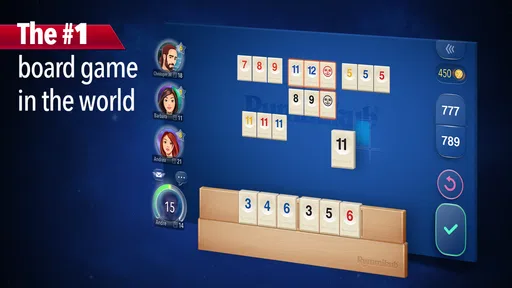
The gameplay itself is smooth and intuitive. Dragging and dropping tiles feels natural, and the app’s responsive design makes it easy to plan your moves. There’s a handy hint feature if you ever find yourself stuck, which I found incredibly helpful during those tricky rounds.
Now, let’s talk about the graphics. They are crisp and vibrant, making the game visually appealing without being overwhelming. The sound effects are subtle and enhance the overall gaming experience without being distracting.
Tabletop feel and mobile trade-offs
The visual clarity matters more here than flashy animation: I need to scan number tiles quickly and distinguish the options I am considering. The art direction keeps attention on that task, so the screen feels like a usable game surface rather than a decorative scene competing with the puzzle. I find that restrained approach suits the game’s mood. It gives each turn room to breathe and makes a quiet solo session feel focused rather than empty.
Compared with the physical set, the app removes setup, tile sorting, and the need to gather everyone in one place. That is a genuine advantage when I want a quick game or a remote match. The physical version still has the edge for a relaxed face-to-face evening: handling tiles, seeing reactions, and chatting around the table are part of that experience. For a phone, though, digital convenience is the point, and the interface makes the board easier to revisit whenever I have a spare moment.
Why You Might Love It
One of the standout features of the Rummikub® app is its social aspect. You can invite friends to play, join public tables, or even chat with fellow players during matches. It’s a fantastic way to connect with others, especially if you’re looking for a fun way to pass the time.
Another plus is the app’s performance. I didn’t encounter any lags or crashes during my playtime, which is always a bonus. The developers seem to have prioritized a seamless user experience, and it shows.
Who will get the most from it
The game works particularly well for a mixed group: someone who has played for years can share a match with a newcomer, while the basic goal stays understandable from the outset. It also suits players who like competitive choices but prefer a calm pace to frantic rounds. Kinkajoo has made a free board game that can serve as a casual pastime or a more deliberate test of planning, depending on how seriously I approach each turn.
It is less compelling if I want a game that constantly rewards brief check-ins with rapid action. A board position can change while I am considering a move, and I would rather give it attention than rush through a decision. If I only want a simple matching game with no interaction or tactical planning, a lighter puzzle may be a better choice. Here, the pleasure comes from weighing options and adapting to what other players put down.
Room for Improvement
While the app is mostly a home run, there are a few areas that could use a little polish. For example, the multiplayer matchmaking can sometimes take a while, especially if you’re trying to connect with friends. Also, while the game offers in-app purchases, they aren’t necessary to enjoy the core experience, which is great—but it’s something to keep in mind if you’re not into spending extra cash.
What to expect before installing
The game is free to download, is rated for Everyone, and runs on Android 7.0 or later. Its current version is 4.12.12, and optional in-app purchases range from $2.99 to $99.99 per item, so I would check purchase prompts carefully if I share a device or prefer to keep spending under control. Those details do not change the appeal of the basic tile game, but they are worth knowing before handing a phone to a younger player.
Its reach suggests that plenty of people have found a reason to keep it on their devices: it has more than 10 million installs, around 290,000 ratings with a 4.6 average, and roughly 6,100 written reviews. It was released on October 3, 2017, and the long-running presence makes sense for a game whose core pleasure comes from replaying a familiar challenge rather than following a one-time story. I would still choose it for the rules and the company, not simply because it is popular.
Sound, pacing, and a useful routine
The restrained sound effects fit the measured turn-taking better than a loud soundtrack would. I like that the audio stays in the background while I work through possible sets and runs; if I am playing somewhere quiet, the visual cues carry most of the experience. The pacing has a similar character. A round can be lively when the table opens up, then slow as players search for a workable move, and that pause is part of the strategy rather than a flaw in need of constant stimulation.
One practical habit I would recommend is separating “I can play this” from “I should play this now.” Before committing a useful tile, I look at what the move leaves behind and whether it opens a better arrangement for the next turn. That is especially helpful in a digital match, where it is easy to tap quickly and only then notice the consequences. The app makes turns convenient; a little patience is what makes them satisfying.
Final Thoughts
All in all, the Rummikub® app is a fantastic addition to any puzzle lover’s collection. It captures the charm of the original game while offering a modern twist that’s perfect for mobile devices. Whether you’re killing time on your commute or winding down after a long day, this game offers the perfect balance of challenge and relaxation.
If you’re intrigued and want to give it a shot, you can download it from the App Store or Google Play. Trust me, once you start, it’s hard to stop! Happy gaming!
My atmosphere verdict
For me, the strongest part of the experience is the match between presentation and play. Clear tiles, understated effects, and a steady pace keep the attention where it belongs: on finding combinations and judging when to use them. It does not try to turn a familiar board game into something louder or more elaborate than it needs to be. That focus is why I would recommend it to anyone who enjoys thoughtful tile play and wants a convenient way to return to it.
I would pick the app over a physical set when I am alone, travelling, or trying to arrange a game with friends who are not nearby. I would choose the tabletop version when the point is to spend time together in the same room. That is the honest dividing line: this is a handy, approachable digital home for a classic kind of puzzle, not a replacement for every pleasure of playing face to face.
Pros
- Smooth and intuitive user interface.
- Multiplayer mode enhances social interaction.
- Customizable game settings.
- Offline mode available for solo play.
- Frequent updates improve gameplay.
Cons
- Occasional connectivity issues.
- Limited chat features in multiplayer.
- In-app purchases can be pricey.
- Tutorial lacks depth for new players.
- Some features locked behind paywall.
FAQs for Rummikub®
What is Rummikub® and how does it work?
Rummikub® is a popular tile-based game that combines elements of rummy and mahjong. The objective is to be the first player to clear all tiles from your rack by forming sets and runs. The app offers both solo play against AI and multiplayer modes for a competitive experience. It’s a blend of strategy and luck, ensuring every game is unique.
Can I play Rummikub® offline?
Yes, the Rummikub® app allows you to play offline against AI opponents. This feature is perfect for when you don’t have internet access but still want to enjoy a game. However, for multiplayer matches and leaderboard updates, an internet connection is required.
What features does the Rummikub® app offer?
The Rummikub® app includes various features such as multiple game modes, a tutorial for beginners, customization options, and an online leaderboard. It also offers chat functionality in multiplayer mode, allowing players to communicate during games. Regular updates often introduce new features and improve gameplay.
Are there in-app purchases in Rummikub®?
Yes, the Rummikub® app offers in-app purchases. These can include additional game modes, customization packs, or hints to help you during games. While the app is free to download, these purchases can enhance your gaming experience, though they are not necessary for enjoying the core game.
Is Rummikub® suitable for all ages?
Rummikub® is designed to be family-friendly and is suitable for players of all ages. Its straightforward rules make it accessible to children, while the strategic depth provides a challenge for adults. It’s a great game for family gatherings or to play with friends, encouraging logical thinking and strategic planning.


